AI Agent Discovery: How to Find Every AI Agent in Your Company (2026)
AI agent discovery is step one of agent security and the step most teams get wrong. Where agents hide in each provider, what finds them, what day one shows.
AI agent discovery is the first of the four questions agent security must answer, and the one most teams get wrong, either by counting every service account as an agent or by missing the agents that never touch a SaaS admin console. This guide covers what counts as an agent, where agents hide in Google Workspace, AWS AgentCore, GitHub, Slack, Salesforce, Claude, ChatGPT and Cursor, what finds them, and why local processes, MCP config files and browser sessions need sensors rather than APIs. Strac discovers all of it into one inventory with an owner, sanctioned state and evidence on every row, then feeds it into permissions, activity and sensitive-data analysis.
AI Agent Discovery: How to Find Every AI Agent in Your Company (2026)
Ask three people in your company how many AI agents are running and you will get three different numbers, all wrong in the same direction. The identity team counts service accounts. IT counts approved SaaS apps. Nobody counts the Claude Code session an engineer started on a laptop this morning, the Zapier flow that still signs into the CRM with a shared login, or the Cursor background agent that was handed a GitHub token three months ago and never revoked.
AI agent discovery is the work of producing one honest list: every AI agent and AI-enabled automation in the business, what each one runs as, who owns it, and whether anyone sanctioned it. It is the first of the four questions that AI agent security has to answer (identity, authorization, activity, data), and every later question inherits its errors. If the inventory is missing an agent, you cannot map its permissions, attribute its actions or join it to the sensitive data it can reach.
It is also the step most teams get wrong, in a specific way: they treat every non-human identity as an agent and end up with thousands of rows of noise, or they count only AI vendor OAuth grants and end up with a dozen rows of guesswork. This guide covers what counts as an agent, where agents hide and what finds them, why API-only discovery misses the fastest-growing kind, what a CISO sees in the first inventory meeting, and how to keep the number honest afterward.
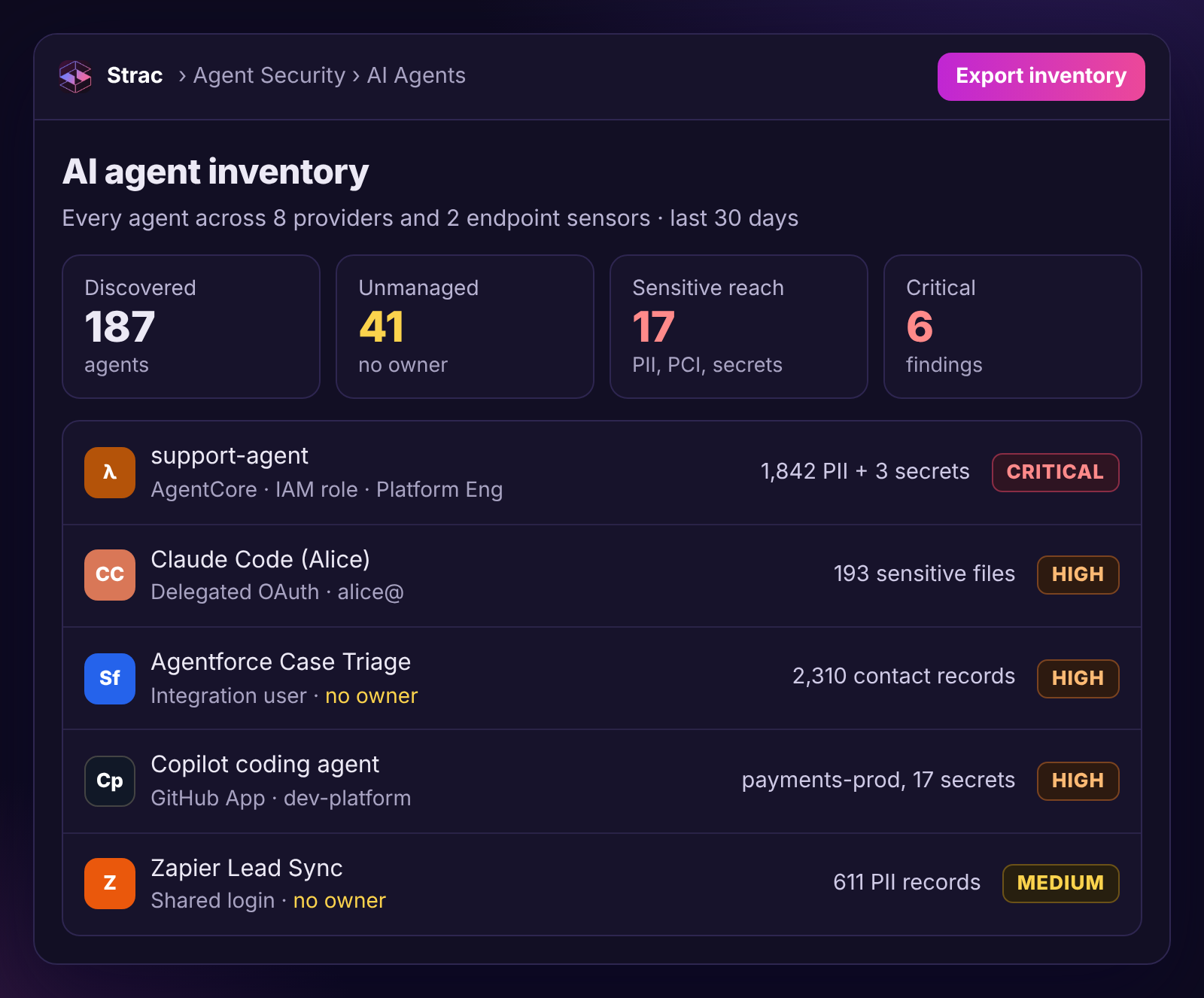
The day-one view. The first number is always larger than anyone expected; the owner column is where the meeting spends its time. Rows without an owner and rows that run as a shared login are the first two things a CISO asks about.
🧭 How do you discover all AI agents in your organization?
A working definition: AI agent discovery is the continuous process of finding every actor in your environment that interprets instructions and chooses its own actions, then recording for each one the identity it acts through, the owner accountable for it, the sources that found it, and its sanctioned state.
Three words in that definition do most of the work.
Continuous. Agents are created by individual users in seconds. A one-time audit is stale before the slide deck is finished. Strac refreshes agent, app and principal inventories every 6 to 24 hours plus on demand, and polls activity feeds every few minutes where the provider supports it.
Actor. The unit of discovery is the thing that acts, which is different from the thing that is installed. One Claude OAuth client can serve many users and sessions, so discovery records the application once, the connection per user, and a specific agent session only when vendor, runtime or sensor evidence supports it. One client per agent undercounts; one token per agent overcounts.
Sanctioned state. An inventory that cannot distinguish the agents security approved from the ones it has never heard of is a list rather than an inventory. Its output is the same artifact a shadow AI program needs: a sanctioned list, an unsanctioned list, and a decision for everything on the second one.
What discovery is not: a permissions audit, an activity log or a data map. Those are the next three questions, each with its own confidence model. Collapsing them produces inventories that claim an agent "accessed payroll" when all anyone knows is that it held a scope that could have.
✨ What counts as an AI agent (and what does not)
The most common inventory mistake comes from a reasonable instinct. Your identity tool has a list of non-human identities, many of them AI-adjacent, so the first draft of the agent inventory is "every NHI that touches an AI vendor." That inventory is wrong in both directions.
A CI bot that runs the same script on every commit is a non-human identity. It is not an agent. Neither is a nightly backup service account or an OAuth app that syncs calendar invites. None of them interpret instructions or choose actions, so none of them have the property that makes agents a distinct risk: a blast radius equal to every permission behind every credential the agent can borrow, which the code tells you nothing about.
Conversely, a Cowork session driving Alice's logged-in Salesforce tab is absolutely an agent, and it has no non-human identity at all. Salesforce sees Alice.
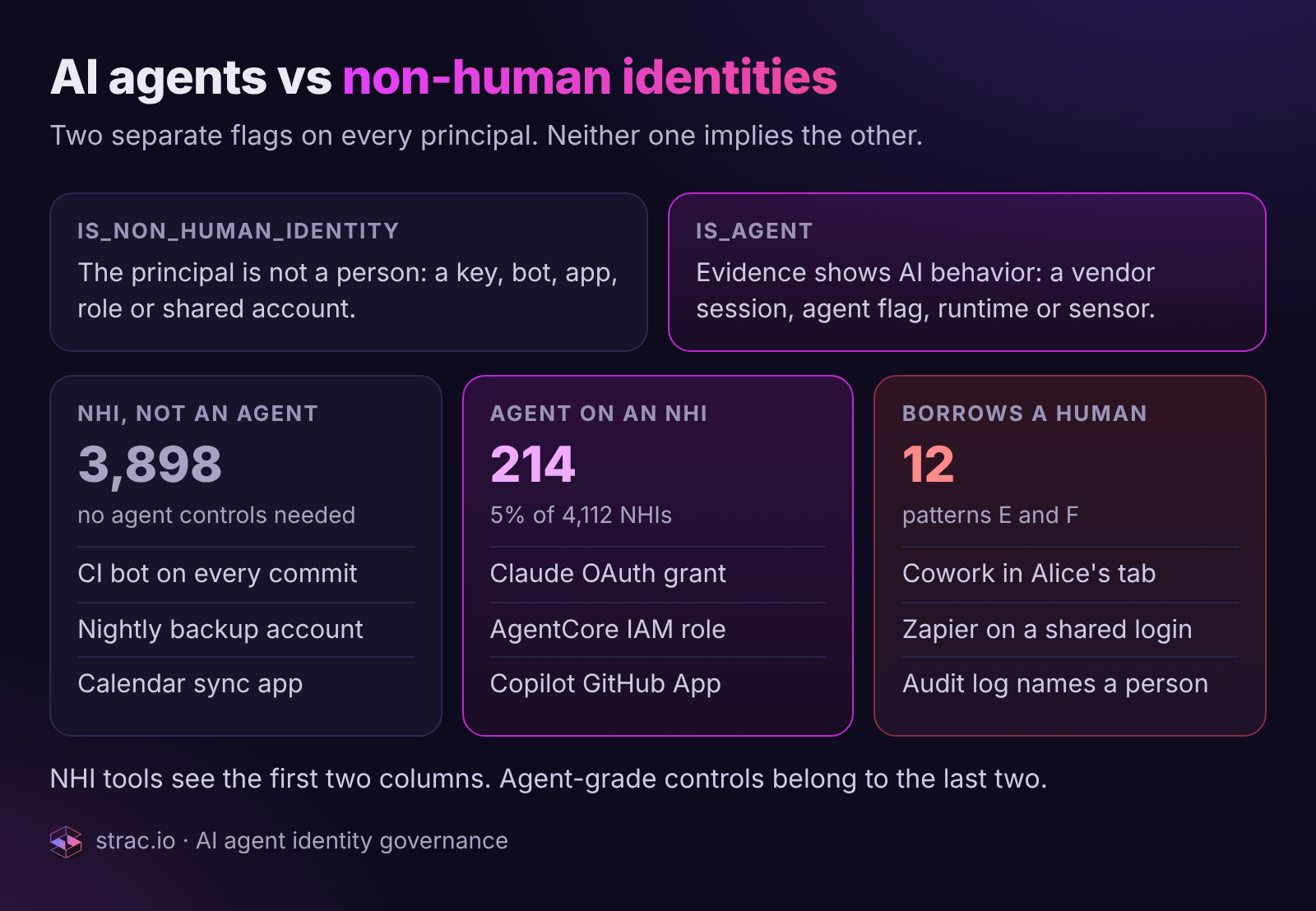
So the classification rule Strac applies: store two independent flags on every principal.is_non_human_identity says whether the principal is a human. is_agent says whether evidence shows AI or agent behavior. Neither implies the other. In a typical mid-size tenant the first flag is true for around 4,000 principals and the second for a couple of hundred, and the couple of hundred are where agent-grade controls belong.
In this tenant 214 of 4,112 non-human identities are used by agents. The third group, agents riding a human's session or shared login, has no NHI at all, which is why an NHI list cannot be the agent inventory.
What evidence sets is_agent, in order of strength:
The provider says so. GitHub's enterprise audit log marks Copilot coding-agent events with actor_is_agent=true and an agent_session_id. AgentCore runtimes are agents by definition. Salesforce Event Monitoring tags Agentforce traffic with BotId and BotSessionId, and MCP server traffic shows up as service=agentic-api-service.
A verified client identifier. A Google OAuth grant whose client_id belongs to Claude, ChatGPT or another known AI vendor, matched against a curated vendor registry with tenant-specific overrides.
A sensor saw it run. An endpoint process for Claude Code, Codex or Cursor; an MCP configuration file; an MCP tool call observed by Strac's MCP sensor; a browser session being driven by an agent process.
Nothing yet. An unknown classification is a valid state. Strac records agent_confidence on every agent and leaves it low until evidence arrives.
What never sets the flag on its own: a display name. "AI Assistant Prod" is not an agent because of the string in its name, and "data-sync-3" is not excluded because of its. Keyword matching on names is the fastest way to build an inventory nobody trusts. Strac attaches the evidence to the classification so a reviewer can disagree with it and see exactly what would change their mind.
✨ Where AI agents hide: SaaS, cloud, endpoints, browsers and MCP servers
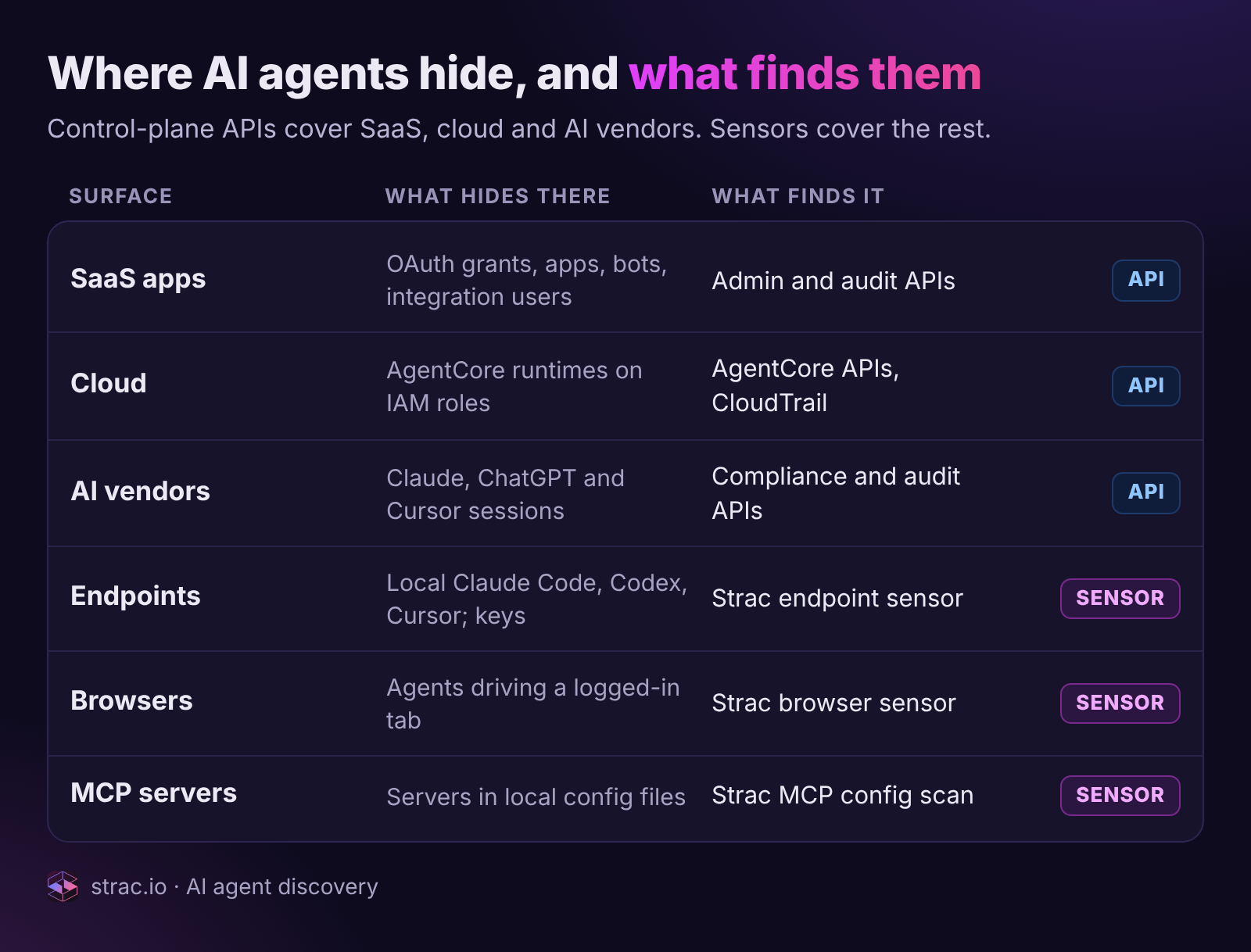
Agents live wherever credentials and data live. Each provider exposes a different control-plane API for finding them, with different fidelity, and each has a blind spot that only a sensor on the endpoint, browser or MCP path can fill. This is the map Strac's discovery connectors are built against.
The first three surfaces are covered by provider control-plane APIs. Endpoints, browsers and local MCP servers are only visible to a sensor that runs where the agent runs.
Where agents hide
What they look like there
What finds them
Pattern and confidence
Google Workspace
Third-party OAuth grants to Claude, ChatGPT, Gemini extensions and MCP servers, acting as the approving user
Admin SDK tokens.list per user (client_id, scopes); Reports API token audit (authorize, revoke, activity)
A. Delegated OAuth; high when client_id is a verified AI client
Slack
Bots and apps with granted scopes and channel grants
E and F; correlated, and often the only evidence that exists
The browser
Computer-use or Cowork agents driving an already-authenticated session
Strac browser sensor: which process controls the tab, URL and account context, uploads and downloads, timing
E. Browser session; correlated, provider audit sees only the human
The execution environment
API keys, PATs and vendor secrets in env files, shell history and agent config
Strac endpoint secrets scan, joined to the principal the secret authenticates as
D. Static credential; fingerprinted, never stored raw
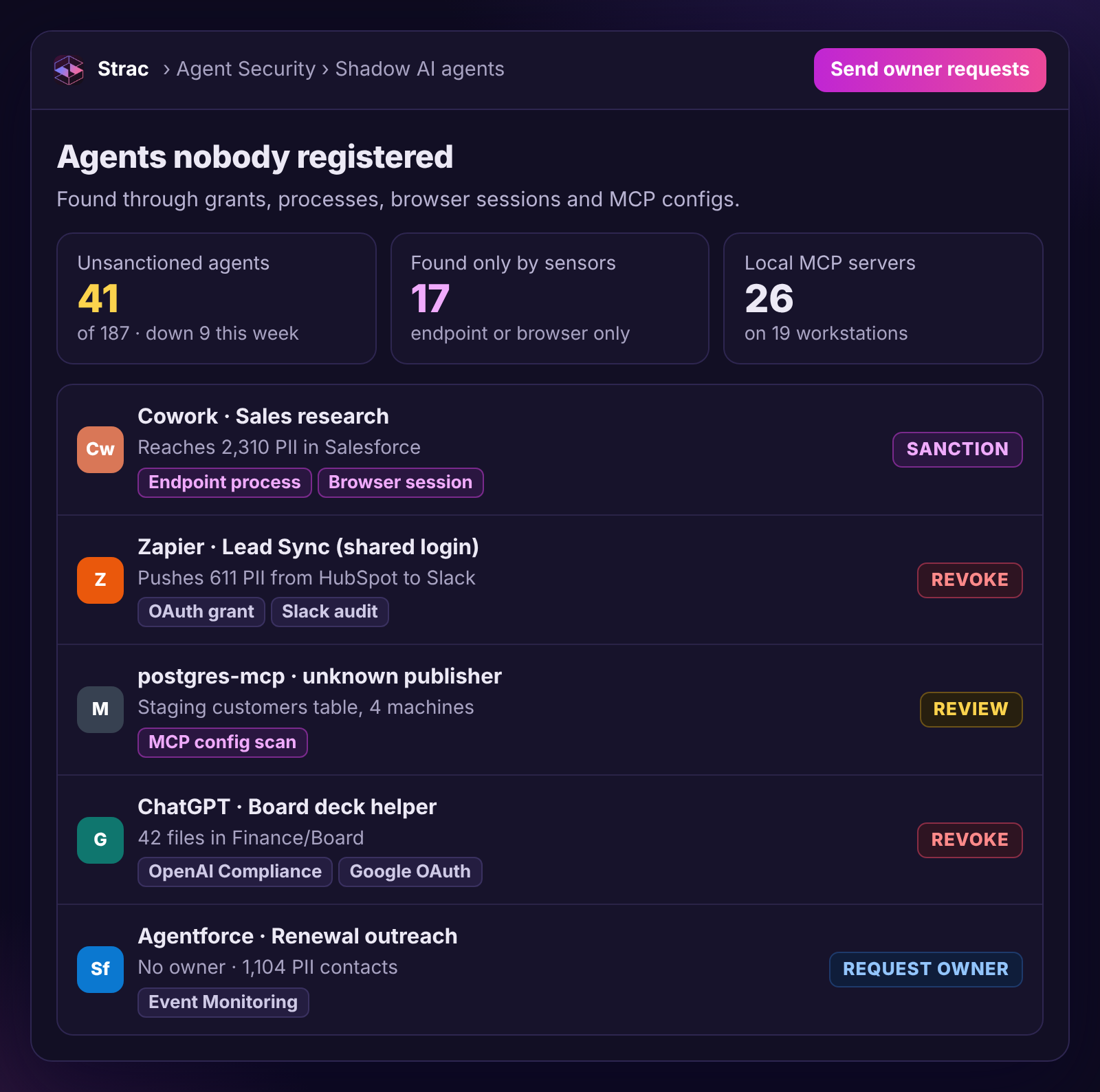
Every row carries the discovery source that found it, such as an endpoint process, browser session, OAuth grant, MCP config scan or Event Monitoring. Of the 41 unsanctioned agents here, 17 were found only by the endpoint or browser sensor.
Two design rules sit behind that table. First, Strac uses provider control-plane APIs and audit logs before building anything inline, because a proxy sees traffic and a control plane sees the grant that needs revoking. Second, every connector reports honest coverage. If a tenant's Salesforce edition lacks Event Monitoring, discovery says "not configured" for that capability. It never returns an empty result that looks like zero agents, and a partial snapshot degrades freshness rather than deleting identities.
✨ What API-only AI agent discovery misses
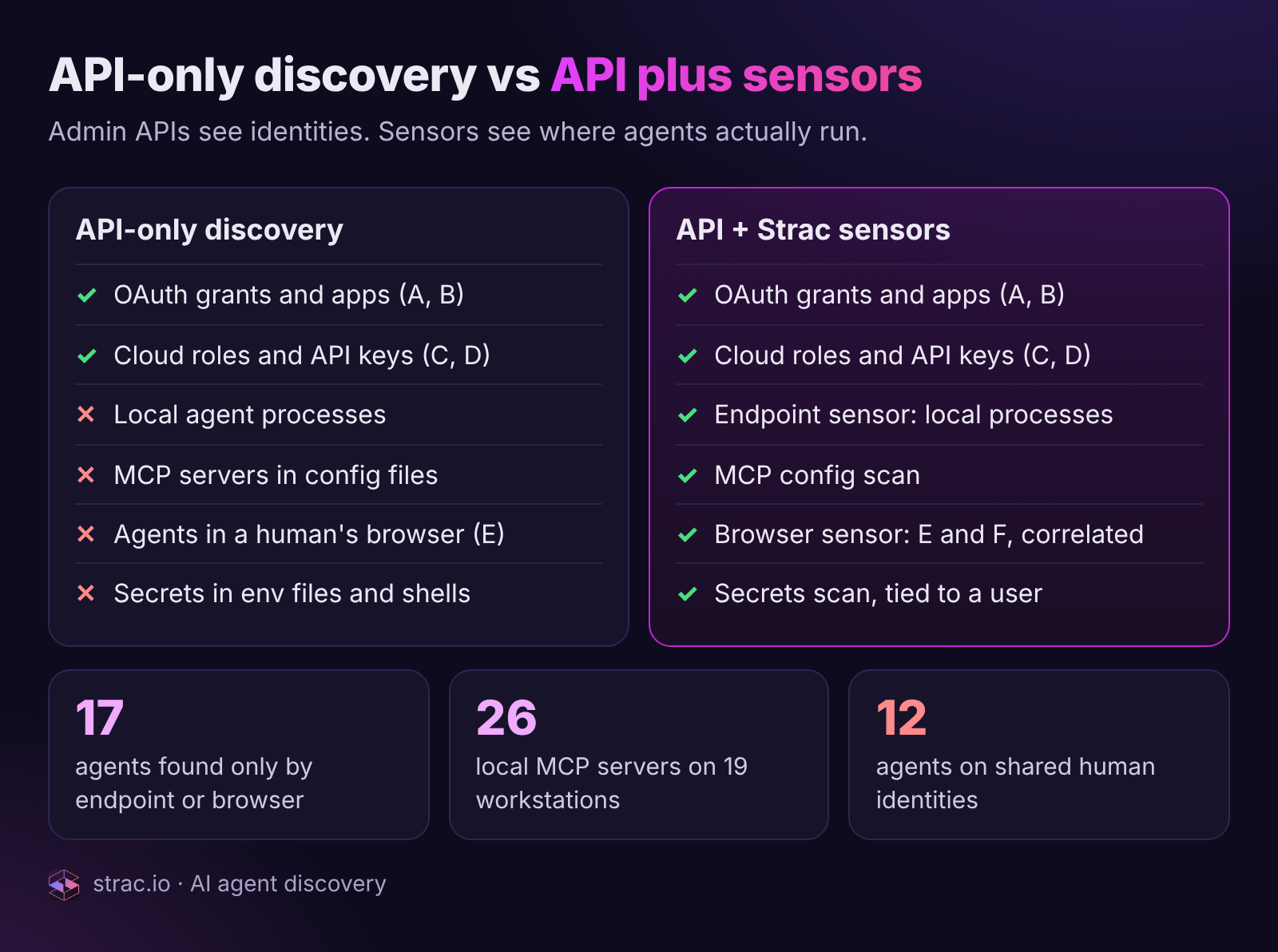
The last three rows of that table are where most agent discovery tools, and most shadow AI detection tools, go blind. They are also where the fastest-growing class of agents lives, and where AI agent visibility is weakest in the companies we talk to.
A SaaS-posture or NHI tool calls each provider's admin API and enumerates OAuth grants, app installations, bot users and IAM roles. That covers identity patterns A through D well. It cannot see:
Local processes. A developer runs Claude Code in a terminal against a repo on their laptop. There is no OAuth grant in any SaaS console; if the agent pushes, GitHub records the developer. Without an endpoint agent on the machine, this agent does not exist in the inventory.
MCP configuration files. Every MCP server a local agent can call is declared in a config file on the workstation, often with the credentials it uses. API-only tools never read that file. Strac's MCP config scan does, which is how one inventory turned up 26 local MCP servers across 19 workstations that no SaaS console had a record of. Shadow MCP servers are an agent discovery problem before they are a data problem.
Browser sessions. A Cowork or computer-use agent takes control of a Chrome tab where Alice is already logged into Salesforce and exports a report. Salesforce's audit log says Alice did it, correctly. The only evidence that an agent acted is the browser and endpoint record of which process controlled the tab and when.
Secrets in the execution environment. Static keys and PATs sit in .env files, shell profiles and agent config directories. The endpoint secrets scan is what ties a key to a device, a user and the agent process that reads it.
Both approaches cover identity patterns A through D. Only the sensor column finds local processes, MCP config files, browser-session agents and secrets on a workstation.
This is why the browser, endpoint and MCP sensors Strac already deploys for AI DLP are the unfair advantage in agent discovery. They are optional evidence adapters into the same graph. The inventory works without them; with them, patterns E and F stop being invisible. For the techniques in more detail, see how to detect shadow AI and the comparison of shadow AI detection tools by the surfaces each can observe.
One rule on honesty: anything a sensor finds is labeled correlated rather than provider-native, with the confidence factors (overlap window, same tab, file lineage) shown so a reviewer can disagree. Weak attribution presented as fact is how inventories lose the trust of the people who have to act on them.
✨ Your first AI agent inventory: what a CISO sees on day one
Strac deploys read-only. Connect Google Workspace, AWS, GitHub, Slack, Anthropic, OpenAI and Salesforce with discovery credentials only, and a small tenant's first inventory usually lands within the hour. The first review of that inventory is the most uncomfortable meeting of the quarter, and it tends to go the same way everywhere.
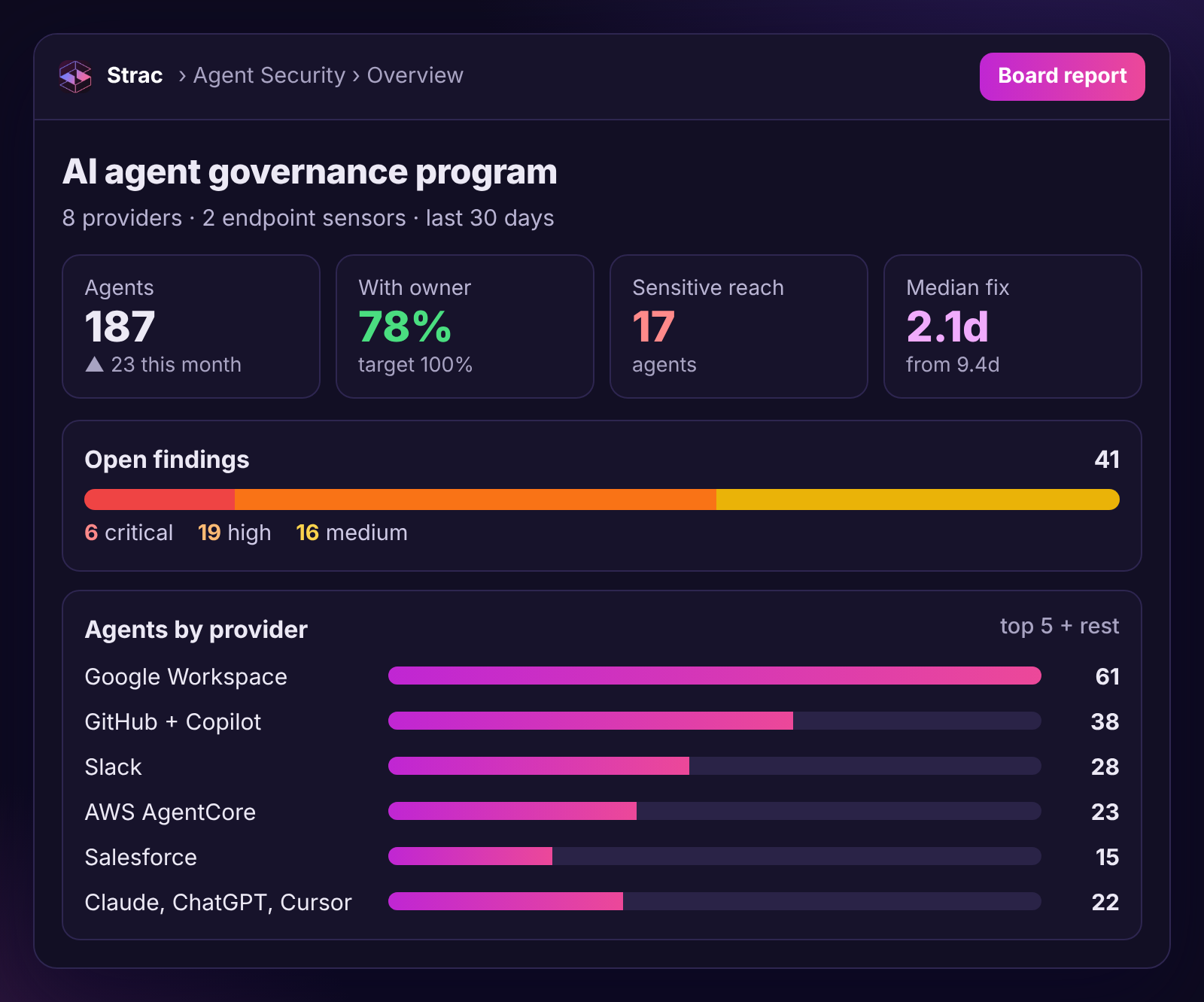
The headline numbers come first: 187 agents discovered, 41 unmanaged, 23 overprivileged, 17 that can reach sensitive data, 6 critical. Then someone asks where the 187 came from, and the answer by provider follows where credentials concentrate: Google Workspace 61, GitHub and Copilot 38, Slack 28, AWS AgentCore 23, Salesforce 15, Claude 11, ChatGPT 7, Cursor 4.
The four categories every first inventory meeting ends up discussing, and where the 187 agents came from. Google Workspace leads because delegated OAuth grants are the easiest agent identity to create.
Then the room looks at the rows, and four categories show up in every first inventory we have seen:
Ownerless agents. An Agentforce case-triage bot with no owner recorded. A Slack app whose installer left the company. An IAM role created for a hackathon. Strac's rule, applied the same way every time: an agent with no accountable owner plus recent activity or a valid credential is a High finding. In a first inventory, that is often a quarter of the rows.
Stale agents with live credentials. No activity for 45 days, token still valid. Nobody is watching, nobody would notice if the credential were used, and the credential works. Nine of the 187 above.
Shared-identity agents. A Zapier lead-sync flow signing into the CRM with a team login. A computer-use agent running under an engineer's browser session. Twelve agents in that inventory use shared human identities, so every audit log in those systems attributes their actions to a person who did not perform them. Only sensors find this category, and it is a Medium or High finding on its own because the provider cannot revoke the agent without revoking the human.
Overprivileged agents. Write, delete or admin capability granted and never exercised in the policy window. The Claude Code session granted gmail.readonly alongside drive.readonly that has only ever called Drive. The Copilot agent with contents:write on twelve repos that has touched two. Twenty-three of the 187. This finding needs the authorization and activity questions too, but discovery is what makes it possible to ask.
What does not happen in a good first meeting: nobody argues about whether the number is real. Every row carries its discovery sources and evidence, so the conversation moves straight to who owns what. If the first hour is spent debating false positives, the inventory has already failed.
🔑 Owner resolution and sanctioning
An agent without an owner cannot be sanctioned, cannot be remediated without a fight, and cannot be offboarded when its creator leaves. Resolving the owner is therefore part of discovery rather than a later governance chore, and how it is done depends on the identity pattern.
Delegated OAuth (A): the user who approved the grant is the default owner. Google's token audit records who authorized the client_id and when.
App, bot or service identity (B): the installer or approver from the provider audit log (app_installed in Slack, the installation actor in GitHub, the creating admin for a Salesforce integration user). This is where ownership most often needs metadata, and where an identity connector such as Okta maps the installer to a current employee and manager.
Cloud workload identity (C): the principal that created the AgentCore runtime or its role, plus role tags where the platform team uses them.
Static credentials (D): the device and user where the endpoint secrets scan found the key. Weak by nature, so pattern D agents are review candidates.
Browser session and shared login (E, F): the human whose session or account was used is recorded as the acting principal, and deliberately not as the owner. The owner is unknown until someone claims it.
That last case is how the inventory stays honest. When discovery cannot resolve an owner with evidence, it does not guess from an email alias or a team name. It opens an owner request to the most likely candidate (the acting user, the installer's manager, the team that owns the connected resource) with a deadline. A governance policy with "owner required" turned on produces 41 owner requests on the first run against the inventory above. Unanswered requests escalate; answered ones update the record with the claim as evidence. Who should be accountable for which agent identity is covered in AI agent identity governance.
Once an owner exists, sanctioning becomes a decision rather than a mystery. Each agent carries a sanctioned_state, and the owner or reviewer picks from a bounded set of actions:
Decision
What it means
When it applies
Sanction + owner
Approved, with a named owner and the discovery evidence attached
Agent is known, scoped and needed
Review
Hold in the open-review queue with a due date
Owner responded but scope is unclear
Request owner
Ownership unresolved; request sent with a deadline
Ownerless rows on day one
Revoke
Remove the credential where a bounded admin API exists (Google token revoke by client_id; Slack restrict or uninstall)
Unsanctioned with sensitive reach, no owner steps forward
Disable
Stop the runtime where the provider workflow allows; otherwise an exact recommendation and console link
Cloud agents in AWS, Salesforce bots
Block
Enforce at the data layer through Strac's browser, endpoint or MCP sensor, so the agent runs but cannot touch classified data
Local or browser agents with no provider-side revocation
Exception
Allowed outside policy, with a reason and an expiry date
Legitimate edge cases that would otherwise be snoozed forever
Exceptions with expiry deserve a sentence on their own. Every inventory accumulates "known, fine, ignore" rows. Without an expiry those rows are indistinguishable from neglect six months later. With one, the inventory re-asks the question on a schedule, which is the difference between a governance program and a spreadsheet. The operating framework is in AI agent governance, and the multi-business-unit version in enterprise AI agent governance.
✨ AI agent sprawl as a number you can track
"AI agent sprawl" is usually a feeling: the sense that there are more of these things every week, nobody knows how many, and somewhere among them are rogue AI agents nobody would notice. Discovery turns the feeling into a number, and a number can be managed.
The program view a security leader reports from. Agent count is up 23 in the period, owner coverage is at 78 percent, and median time to remediate a finding has dropped from 9.4 days to 2.1. The provider breakdown is where to look when one number jumps.
Three metrics make sprawl measurable, and they belong on a monthly slide:
Agent count and its delta. 187 this month, up 23. Growth is fine; unexplained growth is the problem. The provider breakdown explains most spikes (a Copilot rollout, a team adopting Claude Code), and the discovery-source breakdown explains the rest (a jump in agents found only by endpoint means a new local tool is spreading).
Owner coverage. The percentage of agents with an accountable, current owner. 78 percent above, respectable for a program that is a quarter old and unacceptable for one that is a year old. It is the single best predictor of how fast findings get fixed.
Unsanctioned count and its trend. 41 unsanctioned, down 9. If this number is flat while the agent count grows, sanctioning is not keeping up and shadow AI agents are accumulating.
Keeping those numbers honest comes down to habits the product enforces:
Gaps are visible. A connector that loses scope or hits an entitlement wall reports a coverage gap instead of a clean zero.
Offboarding triggers a re-check. When an owner leaves, every agent they owned reverts to ownerless and reopens an owner request. Agents outliving their creators is the most common way a clean inventory decays.
Stale credentials have a clock. A policy such as "stale credentials revoked at 45 days" means an agent that stops being used stops being a risk, automatically where the provider allows it and with a ticket where it does not.
Exceptions expire. Repeated here because it is the rule most often skipped.
The sensor layer catches what the API layer missed. A new local agent shows up on the endpoint the day it runs, before it has any SaaS footprint, so the "found only by endpoint or browser" number is never a surprise at quarter end.
Discovery is step one: what the inventory feeds
With a stable set of agent IDs, each with an owner, an identity pattern and a sanctioned state, the other three questions become answerable:
Authorization: map what each agent's principal can do, directly and through delegation, and measure granted versus used. See protect AI agents.
Activity: attribute what each agent actually did, from provider audit logs, the Anthropic and OpenAI compliance APIs and Strac's own sensors, with confidence labeled on every event. See monitor AI agents.
Data: join the agent's reach and actions to the classified sensitive-data inventory, so that "can reach 193 sensitive files" and "read payroll.xlsx at 10:04" are findings with proof rather than risk scores.
Strac answers all four in one graph, Agent → Principal → Permissions → Resources → Sensitive data. The agent record that discovery creates is the one that carries the permission map, the activity timeline and the data reach; adding a sensor or connector enriches it rather than creating a second inventory to reconcile.
👉 Book a demo and we will run the agent inventory read-only against your Google Workspace or Slack tenant during the call, and show you the first ownerless agent before it ends.
🌶️ Spicy FAQs on AI agent discovery
What is AI agent discovery?
AI agent discovery is the continuous process of finding every AI agent and AI-enabled automation in an organization, across SaaS, cloud, AI vendor platforms, workstations and browsers, and recording for each one the identity it acts through, its owner, the evidence that found it and whether it is sanctioned. It is the first of the four questions in AI agent security, ahead of authorization, activity and data, and the one the other three depend on.
How is an AI agent inventory different from a non-human identity inventory?
An NHI inventory lists every service account, bot, API key and OAuth app, whether or not anything intelligent sits behind it. An AI agent inventory is the subset that interprets instructions and chooses actions, plus the agents that have no non-human identity at all because they borrow a human's session or login. Strac stores the two as separate flags on every principal; in most tenants a few percent of NHIs are agents, and some agents are not NHIs.
What are shadow AI agents?
Shadow AI agents are agents running in the business that security never sanctioned and often never knew about: a local Claude Code or Cursor process on a laptop, an MCP server declared in a developer's config file, a Zapier flow signing into the CRM with a shared login, or a computer-use agent driving an employee's open browser tab. Most leave no footprint in any SaaS admin console, which is why they are found by endpoint and browser sensors rather than provider APIs.
Can you discover AI agents without installing an endpoint agent?
Partly. Provider APIs find agents that hold an OAuth grant, an app installation, a bot user or an IAM role, which covers identity patterns A through D and most cloud and SaaS agents. They cannot find local agents, local MCP servers, browser-session agents or static credentials on a workstation. Strac's inventory works with API discovery alone and gets more complete when the browser, endpoint and MCP sensors are added, with each row showing which source found it.
How do you tell a real AI agent from a service account with an AI-sounding name?
By evidence, never by name. A provider that explicitly marks agent activity (GitHub's actor_is_agent, Salesforce's BotId, an AgentCore runtime) is the strongest signal; a verified AI vendor client_id on an OAuth grant is next; a sensor observing the agent process, MCP config or tool call is next. A display-name keyword is not evidence in either direction. Strac records an agent_confidence on every agent and leaves unknown classifications unknown rather than guessing.
What should an AI agent inventory show for each agent?
At minimum: the agent and the vendor behind it, the owner, the identity pattern and the principal it runs as, the connected systems, the discovery sources that found it, first and last seen, sanctioned state, and attribution confidence. Once the other three questions are answered, the same record should also carry effective permissions, sensitive-data reach, the activity timeline and open findings, so the inventory row is the entry point to everything known about the agent.
What is AI agent discovery?
AI agent discovery is the continuous process of finding every AI agent and AI-enabled automation in an organization, across SaaS, cloud, AI vendor platforms, workstations and browsers, and recording for each one the identity it acts through, its owner, the evidence that found it and whether it is sanctioned. It is the first of the four questions in AI agent security, ahead of authorization, activity and data, and the one the other three depend on.
How is an AI agent inventory different from a non-human identity inventory?
An NHI inventory lists every service account, bot, API key and OAuth app, whether or not anything intelligent sits behind it. An AI agent inventory is the subset that interprets instructions and chooses actions, plus the agents that have no non-human identity at all because they borrow a human's session or login. Strac stores the two as separate flags on every principal; in most tenants a few percent of NHIs are agents, and some agents are not NHIs.
What are shadow AI agents?
Shadow AI agents are agents running in the business that security never sanctioned and often never knew about: a local Claude Code or Cursor process on a laptop, an MCP server declared in a developer's config file, a Zapier flow signing into the CRM with a shared login, or a computer-use agent driving an employee's open browser tab. Most leave no footprint in any SaaS admin console, which is why they are found by endpoint and browser sensors rather than provider APIs.
Can you discover AI agents without installing an endpoint agent?
Partly. Provider APIs find agents that hold an OAuth grant, an app installation, a bot user or an IAM role, which covers identity patterns A through D and most cloud and SaaS agents. They cannot find local agents, local MCP servers, browser-session agents or static credentials on a workstation. Strac's inventory works with API discovery alone and gets more complete when the browser, endpoint and MCP sensors are added, with each row showing which source found it.
How do you tell a real AI agent from a service account with an AI-sounding name?
By evidence, never by name. A provider that explicitly marks agent activity (GitHub's actor_is_agent, Salesforce's BotId, an AgentCore runtime) is the strongest signal; a verified AI vendor client_id on an OAuth grant is next; a sensor observing the agent process, MCP config or tool call is next. A display-name keyword is not evidence in either direction. Strac records an agent_confidence on every agent and leaves unknown classifications unknown rather than guessing.
Discover & Protect Data on SaaS, AI, MCP, Endpoints & Cloud
Strac provides end-to-end data loss prevention for all SaaS and Cloud apps. Integrate in under 10 minutes and experience the benefits of live DLP scanning, live redaction, and a fortified SaaS environment.


.webp)








.avif)



.gif)
