MCP DLP: How to Prevent Data Loss in Model Context Protocol Deployments
MCP servers give AI agents access to your most sensitive systems. Learn how DLP for Model Context Protocol works and how to protect PII, PHI, and credentials from AI data leaks.
MCP (Model Context Protocol) lets AI agents connect to databases, APIs, Slack, GitHub, and more — creating new unmonitored paths for sensitive data to reach AI providers
Every MCP tool call is a potential data exfiltration vector: PII, PHI, credentials, and source code can all flow through without triggering traditional DLP controls
DLP for MCP means discovering which MCP servers are running, monitoring what data flows through tool calls, and redacting sensitive content before it reaches the model
Strac monitors what employees and AI agents send to GenAI tools — including ChatGPT, Microsoft Copilot, Google Gemini, and Claude — and redacts sensitive data inline before it is submitted
Organizations without MCP-aware data security are flying blind as AI agent adoption accelerates in 2025 and 2026
Model Context Protocol (MCP) is the fastest-moving standard in enterprise AI right now. Introduced by Anthropic in November 2024, MCP has quickly become the default way AI agents connect to external tools — databases, APIs, file systems, SaaS apps, and more. By early 2026, thousands of MCP servers are in production across organizations of every size.
🔓 Open source: add Strac PII/PHI/PCI & secret redaction to your AI agent in 60 seconds with our open-source MCP server — github.com/strac-io/strac-mcp-dlp (pip install strac-mcp-dlp). It exposes redact_text, detect_pii, and file scanning as MCP tools, backed by the Strac API.
Alongside its MCP-layer controls, Strac integrates with the Claude Compliance API, giving teams a second lens on the sensitive data flowing through Claude Enterprise.
The problem: almost none of them have data security controls.
When an AI agent queries your Postgres database, pulls documents from Google Drive, or reads Slack messages through an MCP server, sensitive data flows directly into the model's context window — and from there, potentially to an external AI provider. Traditional DLP tools were not built for this. They watch email attachments and endpoint file transfers. They have no visibility into what your AI agents are doing at runtime.
This post covers what MCP DLP means, what risks MCP creates, and how to protect sensitive data flowing through Model Context Protocol deployments.
What Is MCP and Why Security Teams Need to Care
What Is MCP Security, and How Do You Do It?
MCP security means governing the sensitive data AI agents read and write through the Model Context Protocol. The risk is not the protocol — it is that an agent can pull PII, PHI, or secrets from your SaaS apps, cloud, and databases through an MCP connector. Strac secures MCP at the data layer: it inspects every MCP call in real time and redacts or blocks sensitive data before it reaches the agent, across 40+ connectors, with a full audit trail.
When a team needs to keep using the data in an AI model rather than blocking it, Strac can also pseudonymize or de-identify it — swapping PII, PHI, and PCI for realistic, format-preserving fakes (see Data Pseudonymization).
Model Context Protocol is an open standard that gives AI models a structured way to call external tools and retrieve data at runtime. Think of it as a universal API layer between an LLM and everything else in your stack.
An MCP server exposes a set of "tools" — functions the AI can call. A database MCP server might expose query_database. A file system MCP server exposes read_file. A Slack MCP server exposes search_messages. The AI model decides which tools to call based on the user's request, calls them, and uses the results as context to generate a response.
This is powerful. It is also a significant data security gap.
Before MCP, AI agents operated mostly on text the user typed. With MCP, they operate on live data pulled from your most sensitive systems. Every tool call is a data retrieval event, and in the default configuration, nothing monitors what gets retrieved or whether it contains PII, PHI, credentials, or confidential business data.
✨ How MCP Creates Data Loss Risks
The core risk is straightforward: MCP servers have broad access to sensitive data, and the AI models they serve have no data security controls applied to what they receive.
Strac connects with all SaaS, Cloud integrations including MCP
There are four specific ways MCP creates data loss exposure:
1. Sensitive data in tool responses
When an MCP server queries a database or fetches a document, the response often contains far more sensitive data than the task requires. A query for "customer contact info" might return SSNs, payment details, and medical history alongside the email address the agent actually needed. All of it flows into the model's context window.
2. Data sent to external AI providers
If the MCP-connected agent uses a hosted model (GPT-4, Claude API, Gemini), the context window — including all tool responses — is transmitted to that provider's infrastructure. Sensitive data retrieved through MCP tool calls leaves your environment with every API call.
3. Prompt injection through MCP tool responses
Attackers can embed instructions inside data that an MCP server retrieves. A malicious document stored in your file system might contain hidden text instructing the AI to exfiltrate data through a subsequent tool call. Invariant Labs demonstrated this in 2025: a poisoned MCP server exfiltrated an entire WhatsApp message history through a chained tool call. The user saw nothing unusual.
4. Shadow MCP servers
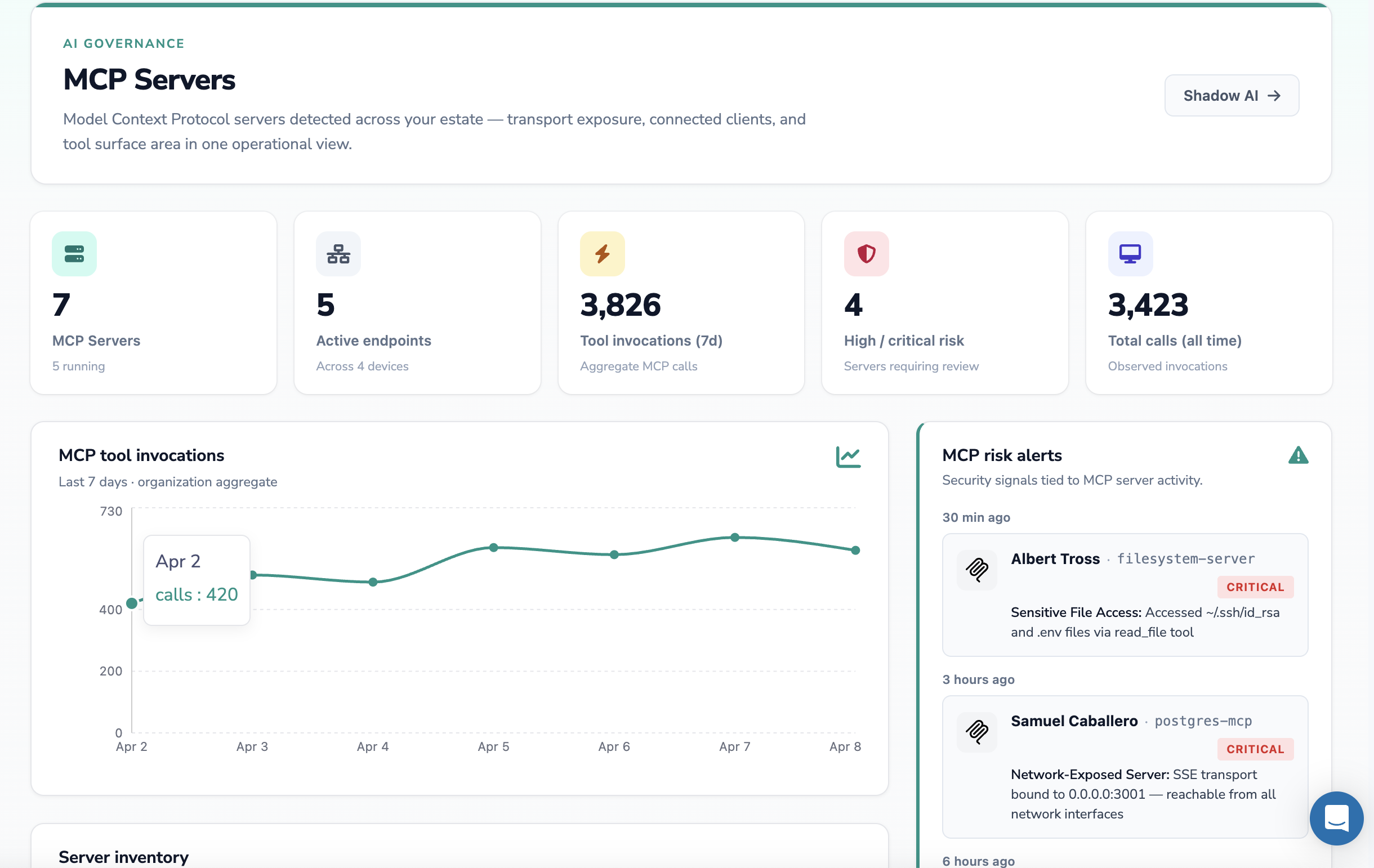
Developers spin up MCP servers locally or in staging environments without security team visibility. These servers often have direct database or API access with no audit trail. Shadow MCP is the new shadow IT — except the blast radius is larger because AI agents can act autonomously.
What Sensitive Data Flows Through MCP Servers
The answer depends on which tools your MCP servers expose, but in practice the risk surface is broad:
PII — names, emails, phone numbers, addresses — from CRM or database MCP servers (Salesforce, Postgres, DynamoDB)
Any of these can appear in a model's context window during normal agent operation. None of them are visible to traditional endpoint or email DLP tools.
🎥 What MCP DLP Actually Does
DLP for MCP operates at the data flow layer — monitoring what goes into model context windows and what comes back out through tool calls.
Strac monitors what employees send to AI tools and redacts sensitive data before it reaches the model — the same capability needed for MCP environments.
A proper MCP DLP approach requires four capabilities:
Discovery — identifying which MCP servers exist across your environment, what tools they expose, and what data sources they have access to. You cannot protect what you cannot see.
Classification — detecting sensitive data in MCP tool responses before it reaches the model context. This means running PII, PHI, PCI, and credential detection against the content flowing through each tool call in real time.
Redaction — masking or removing sensitive data from tool responses before the AI model processes them. The agent still gets a useful response; it just does not get the credit card number or SSN it did not need.
Alerting and audit — logging what data was retrieved through which MCP server, by which agent, in response to which user request. This creates the audit trail required for HIPAA, PCI DSS, SOC 2, and GDPR compliance.
What Strac MCP DLP does
How it works on every tool call
The risk it closes
Redact sensitive data
Masks PII, PHI, PCI, and secrets inside the tool response before it ever reaches the model.
Raw regulated data landing in the model, its context, and downstream logs.
Enforce per-user identity
The agent only retrieves what the underlying user is actually permitted to see.
The confused-deputy problem, where an agent over-reaches with broad permissions.
Inspect for prompt injection
Scans the response leg for hidden instructions that try to hijack the agent.
Agents tricked into exfiltrating data through their own authorized tool calls.
Log every tool call
Keeps a full audit trail of what each agent read, when, and on whose behalf.
No visibility into what agents accessed, a gap for SOC 2, HIPAA, and PCI.
Govern per connector
Applies policy per SaaS across 40+ MCP servers (SharePoint, Slack, Jira, and more).
Blind spots where one tool leaks while the rest are covered.
What Strac MCP DLP enforces inline on every MCP tool call, so agents stay useful without becoming a leak path.
Strac MCP DLP in Action: SharePoint Redaction
The best way to understand MCP DLP is to see it working. Strac built a working MCP server — strac-m365-dlp — that connects Claude directly to Microsoft 365 (SharePoint and OneDrive) with automatic DLP redaction on every document retrieval.
Here is the architecture:
🎥 The Strac Approach to GenAI and MCP Data Security
Strac was built for exactly this problem. It monitors what employees and AI agents send to GenAI tools — ChatGPT, Microsoft Copilot, Google Gemini, and Claude — and redacts sensitive data inline before it is submitted to the model.
Strac redacts sensitive data inline — the same capability powers both browser-based GenAI monitoring and the MCP server redaction layer.
The core architecture maps directly to MCP security needs:
Data discovery across your stack — Strac scans 50+ integrations including AWS S3, Google Drive, Slack, GitHub, Salesforce, and Snowflake. These are the exact data sources MCP servers connect to. Strac builds a live map of where sensitive data lives — so you know what MCP servers could potentially access.
Inline detection and redaction — Strac detects PII, PHI, PCI, and credentials with custom ML models trained for accuracy. It redacts sensitive data before it reaches the AI model, not after. Redaction happens on the content itself — not just a flag that something was found.
Image and document detection — Strac is the only data security platform that detects sensitive data inside images (JPEG, PNG) and documents (PDF, Word, Excel, ZIP) using OCR. MCP file system servers frequently surface these file types; traditional regex-based tools miss them entirely.
Agentless deployment — no endpoint agents, no proxies. Strac connects via API in under 10 minutes. For teams moving fast on MCP deployments, this matters.
To see Strac's full catalog of detectable sensitive data elements, including all PCI, HIPAA, and GDPR data types, visit the Strac detector catalog.
✨ Strac MCP DLP — Per-SaaS Deep Dives
The MCP DLP pattern in this post is implemented across every SaaS surface AI agents reach via Model Context Protocol. Each guide below covers the same architecture — AI agent → Strac MCP DLP gateway → SaaS — with the specific tool calls, real security risks, and deployment steps for that platform.
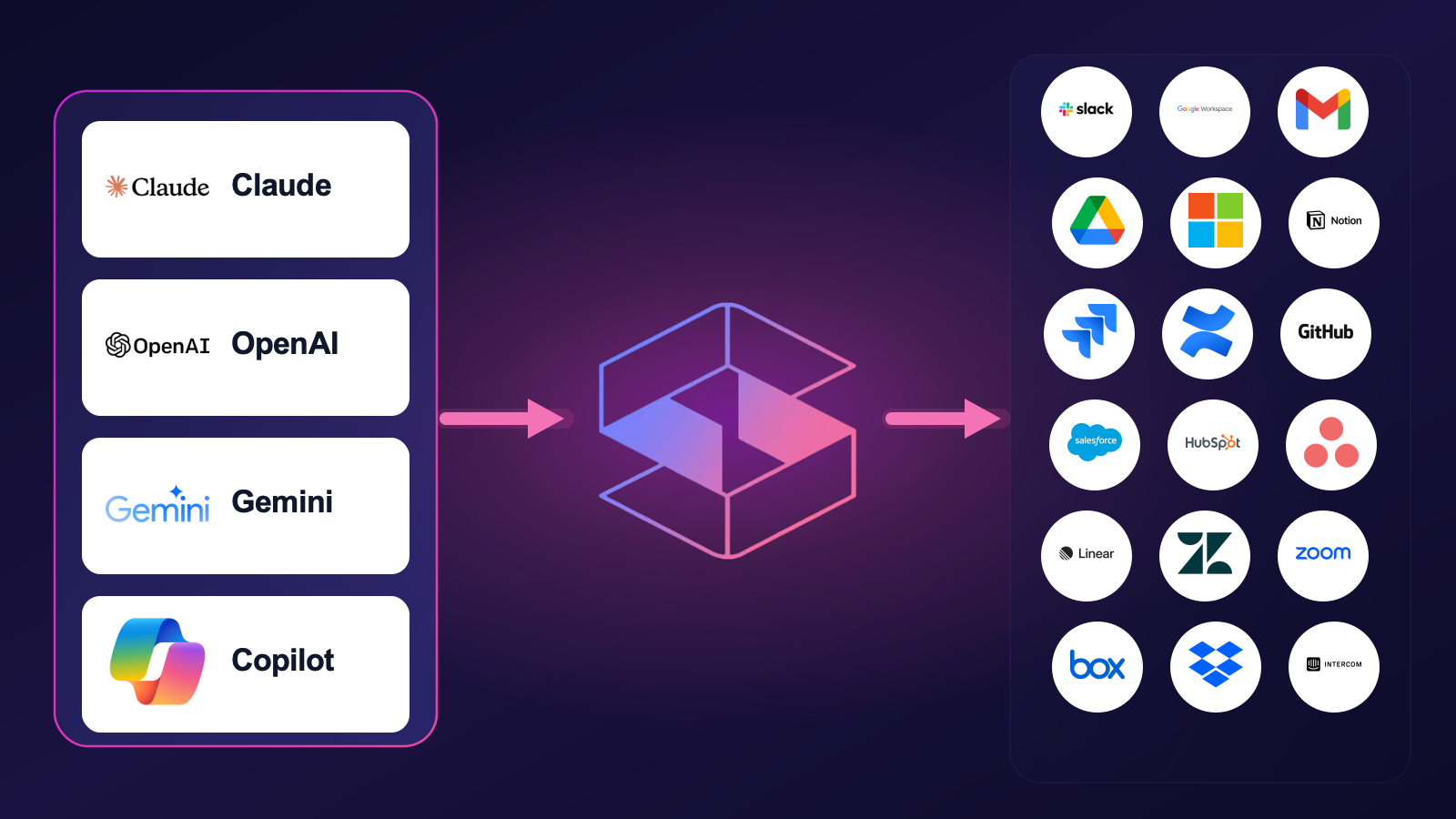
Strac MCP DLP sits between every AI agent (Claude, Cursor, ChatGPT, Cowork, custom) and every SaaS surface — one control plane for the entire MCP cluster.
Slack MCP Server — how to connect Slack to AI agents securely, the documented Anthropic Slack MCP exfiltration vulnerability, and Strac's redaction layer for every Slack tool call.
Google Workspace MCP Server — the umbrella for Gmail, Drive, Docs, Sheets, Calendar, and Chat. Google's native Sensitive Data Protection covers 6 PII categories; Strac extends to PHI, secrets, source code, OCR, and custom ML.
Gmail MCP Server — how the Gmail MCP returns regulated data in every search, and how Strac inspects every message body and attachment at the MCP layer.
Google Drive MCP Server — Drive search matches across the user's entire access scope (including shared drives they forgot they had); Strac inspects every file return, including OCR inside images.
Microsoft 365 MCP Server — secure tool calls across Outlook, OneDrive, SharePoint, and Teams. Microsoft Purview doesn't sit in the MCP path by default; Strac fills the gap.
Notion MCP Server — Notion search reaches across every workspace the user joined; Strac inspects pages, databases, and embedded files at the protocol layer.
Jira MCP Server — issue comments and attachments accumulate sensitive context (stack traces with PHI, HAR files with auth tokens, screenshots with secrets). Strac inspects every Jira tool response.
GitHub MCP Server — code search and file reads return hardcoded secrets, .env leaks, and customer data in test fixtures; Strac inspects every GitHub tool response.
Linear MCP Server — issue bodies and comment threads accumulate customer PII and pasted credentials; Strac redacts at the MCP layer.
Salesforce MCP Server — every CRM record is regulated data; SOQL gives the agent database-level reach. Strac inspects records, custom objects, and attachments.
Confluence MCP Server — runbooks and ops pages are full of pasted credentials; Strac inspects pages, attachments, and comments.
HubSpot MCP Server — CRM contacts, engagement history, and deal notes are a deep PII archive; Strac inspects every HubSpot tool response.
Asana MCP Server — task descriptions, comments, and attachments carry customer data; Strac redacts before content reaches the model.
Zendesk MCP Server — support tickets are a PII and PCI firehose; Strac inspects ticket comments, attachments, and user profiles.
Postgres MCP Server — agents run SQL against your production database; Strac scopes table and column access, blocks writes and bulk exports, and redacts regulated columns before rows reach the model.
Snowflake MCP Server — Cortex Analyst turns prompts into SQL across the warehouse; Strac caps bulk scans and redacts PII, PHI, and PCI column-by-column.
Databricks MCP Server — Genie and Unity Catalog put the lakehouse one prompt away; Strac governs which tables an agent reaches and redacts the rows it returns.
BigQuery MCP Server — natural-language SQL across datasets; Strac scopes access and redacts regulated columns before results reach the model.
MongoDB MCP Server — the official server defaults to read-write and spans the Atlas control plane; Strac redacts PII at any document nesting depth and blocks risky writes and drops.
Amazon Redshift MCP Server — the warehouse concentrates cross-source PII; Strac caps billion-row columnar scans and redacts PII, PHI, and PCI column-by-column.
Azure SQL MCP Server — Microsoft pulled its own MSSQL sample as unsafe; Strac blocks writes and DDL and redacts columns even where Dynamic Data Masking is bypassed.
MySQL MCP Server — a fragmented ecosystem of community servers holding DB credentials; Strac is one governance layer that blocks writes and file operations and redacts PII.
Oracle MCP Server — SQLcl MCP runs SQL and PL/SQL and inherits the saved DBA connection; Strac blocks risky PL/SQL egress and redacts regulated columns.
Microsoft Teams MCP Server — the official Work IQ server reaches private chats with no read-only mode; Strac scopes chats and channels, blocks posting, and redacts message and file content.
GitLab MCP Server — agents read code, pipelines, and CI/CD variables; Strac detects and redacts secrets in code and job logs and blocks risky writes.
Docusign MCP Server — executed agreements are dense with PII and counterparty data; Strac blocks envelope sending and redacts SSNs and financial terms from signed documents.
Airtable MCP Server — bases are ungoverned shadow databases of customer and HR PII; Strac scopes bases and fields, blocks deletes, and redacts records.
Grafana MCP Server — observability logs hide unclassified PII and leaked secrets, and Grafana pivots into other datasources; Strac redacts log lines and blocks dashboard and alert changes.
Stripe MCP Server — agents reach customers, charges, and payment data; Strac masks card data and redacts PII before it reaches the model.
ServiceNow MCP Server — incidents and records carry PII and credentials; Strac scopes access and redacts regulated fields at the tool-call boundary.
Atlassian MCP Server — Jira and Confluence in one connector; Strac redacts PII and secrets across issues, pages, and attachments and blocks risky writes.
Shopify MCP Server — agents reach customer and order data; Strac redacts PII and payment data in every tool call.
Figma MCP Server — design files and comments can leak PII and secrets pasted into frames; Strac inspects and redacts what the agent pulls back.
Chrome DevTools MCP Server — network logs and HAR files expose tokens, cookies, and request bodies; Strac redacts secrets and PII before they reach the model.
Playwright MCP Server — test traces and recordings capture credentials and env vars; Strac redacts secrets and PII from captured traffic.
Zapier MCP Server — the meta-connector reaching 8,000+ apps — one endpoint multiplies the blast radius; Strac inspects every action and payload before it reaches the model.
Supabase MCP Server — Postgres tables, rows, and the auth.users schema exposed through SQL tool calls; Strac redacts at the column level before rows reach the model.
Google Sheets MCP Server — spreadsheets full of PII and PCI reached cell-range by cell-range; Strac redacts every Sheets tool call.
QuickBooks MCP Server — customers, invoices, and bank transactions — financial and PCI data flowing to AI agents, governed by Strac at the MCP layer.
NetSuite MCP Server — SuiteQL over customers, employees, and GL transactions — ERP-grade PII and financial data, redacted by Strac on every tool call.
Workday MCP Server — worker profiles, compensation, and benefits — the densest HR PII in the enterprise, redacted before it reaches the model.
For the broader integration catalog — native DLP for every SaaS, cloud, browser, and endpoint — see strac.io/integrations.
MCP is one of four AI surfaces Strac protects — and the others matter, because an agent is rarely the only way data leaves:
Browser DLP — prompts typed into ChatGPT, Claude, Gemini and Copilot.
Endpoint DLP — local AI applications across Mac, Windows and Linux.
Shadow AI discovery — the AI tools and agents nobody approved.
AI governance — the policy and evidence layer over all of it.
Every MCP server and agent, with the systems it can actually reach.
🌶️ Frequently Asked Questions
What is MCP DLP?
MCP DLP (Model Context Protocol Data Loss Prevention) refers to data security controls applied to data flowing through MCP servers and AI agent tool calls. It involves discovering MCP servers across an environment, classifying sensitive data in tool responses, and redacting or blocking that data before it reaches an AI model's context window or is transmitted to an external AI provider.
How is MCP DLP different from traditional DLP?
Traditional DLP monitors email, endpoint file transfers, and web uploads. It has no visibility into AI agent runtime behavior — it cannot see what an MCP server returns when an AI agent queries a database, nor can it monitor what enters a model's context window. MCP DLP operates at the AI data flow layer: it monitors tool calls, classifies content in real time, and acts before the sensitive data reaches the model.
What regulations apply to sensitive data in MCP environments?
The same regulations that apply to sensitive data everywhere. HIPAA requires protecting PHI regardless of whether it is accessed by a human or an AI agent — an MCP server querying patient records triggers the same PHI protection requirements as a human database query. PCI DSS requires protecting cardholder data in transit and at rest, including in AI context windows. GDPR and CCPA apply to any processing of personal data, including retrieval through automated AI agents. SOC 2 CC6.7 requires data transmission controls that cover AI data flows.
Can prompt injection through MCP servers cause data loss?
Yes. This is one of the most serious MCP security risks in 2025-2026. An attacker who can place malicious content in a data source that an MCP server retrieves can embed instructions that cause the AI agent to exfiltrate data through subsequent tool calls. Strac's real-time content classification detects suspicious patterns in tool responses and can block or alert on anomalous data flows before exfiltration occurs.
Does Strac monitor all AI tools employees use?
Strac monitors ChatGPT, Microsoft Copilot, Google Gemini, Claude, and other GenAI tools for sensitive data in submissions. It detects what employees type into these tools and redacts sensitive data before it is sent. For MCP-connected AI agents, Strac's DSPM capabilities provide visibility into what sensitive data exists in the systems those agents connect to. Book a demo to see the full scope of coverage for your environment.
What types of sensitive data does Strac detect in GenAI and MCP flows?
Strac detects all major sensitive data categories: PII (names, emails, phone numbers, SSNs, addresses), PHI (patient names, MRNs, diagnoses, insurance IDs), PCI data (credit card numbers, CVVs, bank account numbers), credentials (API keys, passwords, tokens, private keys), and custom data elements defined by your organization. Critically, Strac detects these not just in plain text but inside images, PDFs, Word documents, Excel files, and ZIP archives — file types that MCP file system servers routinely surface.
Does the Strac MCP server work with Microsoft 365 and SharePoint?
Yes. Strac built a working MCP server (strac-m365-dlp) that connects Claude to SharePoint and OneDrive via the Microsoft Graph API. It supports DOCX, XLSX, PPTX, CSV, TXT, and JSON document types. Every file retrieval passes through Strac's redaction engine before the content reaches Claude's context window — SSNs, credit cards, emails, phone numbers, AWS keys, and other sensitive data are replaced inline. The server authenticates via an Azure AD service principal and runs over stdio, so it works with Claude Desktop and any MCP-compatible client out of the box.
MCP is moving faster than most security teams can track. The organizations that get ahead of this now — with visibility into what their AI agents access and redaction controls on what reaches the model — will avoid the data breaches that are already happening to those who do not.
Strac Zoom MCP DLP protects every tool call between AI agents and Zoom — meetings, recordings, transcripts, chat, webinars, and contact center. It also enforces the corporate-vs-personal Zoom account policy at the browser layer, blocking personal-account use on work devices.
Box, Dropbox & Intercom MCP — new in 2026
Strac Box MCP DLP — redacts files, folders, Box Notes, M&A diligence material, and image-based PDFs at the tool-call boundary.
Strac Dropbox MCP DLP — redacts files, Paper docs, and shared-link payloads, with browser-side enforcement of the personal-vs-corporate Dropbox account policy.
Strac Intercom MCP DLP — redacts customer conversations, contacts, and attachments. Layered with Strac’s existing Intercom DLP for message-time + agent-time coverage.
SharePoint MCP — new in 2026
Strac SharePoint MCP DLP covers the densest regulated-data surface inside Microsoft 365 — document libraries, custom lists, public sharing links, and external-tenant guests. The same MCP gateway also runs continuous discovery of publicly and externally exposed SharePoint content, and surfaces remediation paths (revoke public links, remove external members, restrict over-permissive permissions) honouring your Microsoft Purview classification labels.
Which AI Tools Work With Strac's MCP DLP?
Yes — Strac's MCP DLP works with every MCP-compatible AI client, across every SaaS you connect. Because detection runs at the protocol level, the same configurable policy (redact, mask, block, or alert) and the same who-accessed-what audit log travel with your data no matter which assistant — Claude, ChatGPT, Gemini, Copilot, or Perplexity — fires the request.
Does Strac's MCP DLP Work With Claude (Claude.ai, Claude Code & Cowork)?
Yes. Strac's MCP DLP works with Claude as a remote custom connector across Claude.ai on the web, Claude Desktop, Claude Code, and Cowork on every plan, since Anthropic's connectors run from its own cloud and reach your connected SaaS through the MCP server Strac governs. When an analyst asks Claude to summarize a Slack incident channel or pull a customer record from Salesforce, Strac inspects that tool response before it reaches the model and applies your configured policy — redact, mask, block, or alert — while logging the user, the tool, and the matched data type either way. Detection and the audit trail are always on; the enforcement action is yours to set, which is why MCP DLP behaves identically whether Claude is reading a Google Drive doc or writing a GitHub issue.
Does Strac's MCP DLP Work With OpenAI ChatGPT & Codex?
Yes. Strac's MCP DLP works with ChatGPT through Developer Mode, the beta path OpenAI provides for full MCP connectors on Plus, Pro, Business, and Enterprise — note that this is not the default consumer experience, so the connector is enabled deliberately by your admins. It also works with Codex, which connects to MCP servers over stdio or streaming HTTP from the CLI and IDE, so a developer asking Codex to fetch a Stripe customer or scan a private repo still has every response checked against your policy. Whether the action is redact, mask, block, or alert, Strac records the access in the same MCP security audit log, giving you one ledger across both ChatGPT and Codex.
Does Strac's MCP DLP Work With Google Gemini?
Yes. Strac's MCP DLP works with Google Gemini where it is strongest as a client — the Gemini CLI and Gemini's agent and enterprise platform, which Google shipped with official MCP support — rather than the consumer chat app. A platform engineer using Gemini CLI to query a BigQuery export or read a Jira ticket triggers the same inspection: Strac evaluates the tool result and enforces your chosen action, with the detection event and the requesting identity captured every time. The policy you set once governs Gemini exactly as it governs any other client, so moving an agent from Drive to GitHub never changes how MCP DLP treats the data.
Does Strac's MCP DLP Work With Microsoft Copilot?
Yes. Strac's MCP DLP works with Microsoft Copilot through Copilot Studio and GitHub Copilot, both of which consume MCP servers under enterprise allowlist governance — so once an admin allowlists the Strac server, every agent built in Copilot Studio inherits your controls automatically. If a Copilot agent reads a SharePoint file, opens a Salesforce account, or pulls a GitHub pull request, Strac inspects that payload and applies your configured policy of redact, mask, block, or alert before the model sees it. The allowlist model pairs naturally with Strac's always-on audit log, giving security teams a single record of which agent touched which sensitive field across the Microsoft estate, consistent with how AI DLP treats every other connected source.
Does Strac's MCP DLP Work With Perplexity & Other MCP Clients?
Yes. Strac's MCP DLP works with Perplexity, which added custom MCP connectors for Pro, Max, and Enterprise in March 2026; note that Perplexity supports MCP as a client even as it publicly steps back from MCP in its own backend, so we scope this to the connector capability rather than overstating it. The same governance extends to other MCP clients — Cursor, Windsurf, Cline, and Grok — meaning a developer in Cursor reading a private repo or an analyst in Perplexity pulling a CRM record both hit the same inspection point. Across all of them Strac keeps detection and the audit log always on and applies whichever action you configured, so adding a new MCP client never opens a new blind spot.
Related: MCP DLP is the enforcement core. For the full discipline around it — discovering your MCP servers, classifying the data, and choosing between masking, redaction, and tokenization — see MCP data security.
What is MCP DLP?
MCP DLP (Model Context Protocol Data Loss Prevention) refers to data security controls applied to data flowing through MCP servers and AI agent tool calls. It involves discovering MCP servers across an environment, classifying sensitive data in tool responses, and redacting or blocking that data before it reaches an AI model's context window or is transmitted to an external AI provider.
How is MCP DLP different from traditional DLP?
Traditional DLP monitors email, endpoint file transfers, and web uploads. It has no visibility into AI agent runtime behavior — it cannot see what an MCP server returns when an AI agent queries a database, nor can it monitor what enters a model's context window. MCP DLP operates at the AI data flow layer: it monitors tool calls, classifies content in real time, and acts before the sensitive data reaches the model.
What regulations apply to sensitive data in MCP environments?
The same regulations that apply to sensitive data everywhere. HIPAA requires protecting PHI regardless of whether it is accessed by a human or an AI agent — an MCP server querying patient records triggers the same PHI protection requirements as a human database query. PCI DSS requires protecting cardholder data in transit and at rest, including in AI context windows. GDPR and CCPA apply to any processing of personal data, including retrieval through automated AI agents. SOC 2 CC6.7 requires data transmission controls that cover AI data flows.
Can prompt injection through MCP servers cause data loss?
Yes. This is one of the most serious MCP security risks in 2025-2026. An attacker who can place malicious content in a data source that an MCP server retrieves can embed instructions that cause the AI agent to exfiltrate data through subsequent tool calls. Strac's real-time content classification detects suspicious patterns in tool responses and can block or alert on anomalous data flows before exfiltration occurs.
Does Strac monitor all AI tools employees use?
Strac monitors ChatGPT, Microsoft Copilot, Google Gemini, Claude, and other GenAI tools for sensitive data in submissions. It detects what employees type into these tools and redacts sensitive data before it is sent. For MCP-connected AI agents, Strac's DSPM capabilities provide visibility into what sensitive data exists in the systems those agents connect to. Book a demo to see the full scope of coverage for your environment.
Discover & Protect Data on SaaS, AI, MCP, Endpoints & Cloud
Strac provides end-to-end data loss prevention for all SaaS and Cloud apps. Integrate in under 10 minutes and experience the benefits of live DLP scanning, live redaction, and a fortified SaaS environment.


.webp)








.avif)



.gif)
