
Cart(
0
)
No items found.
Product is not available in this quantity.





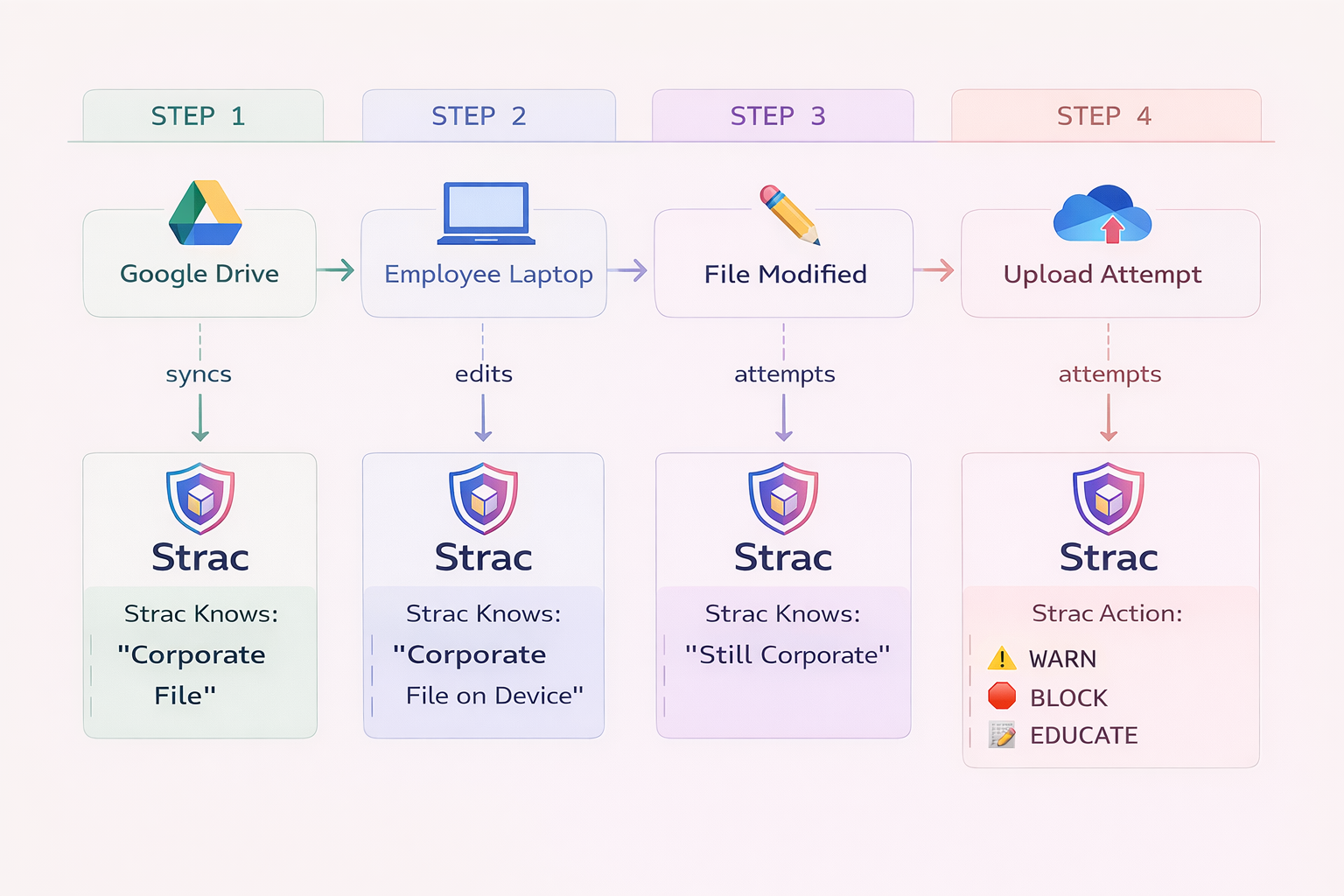
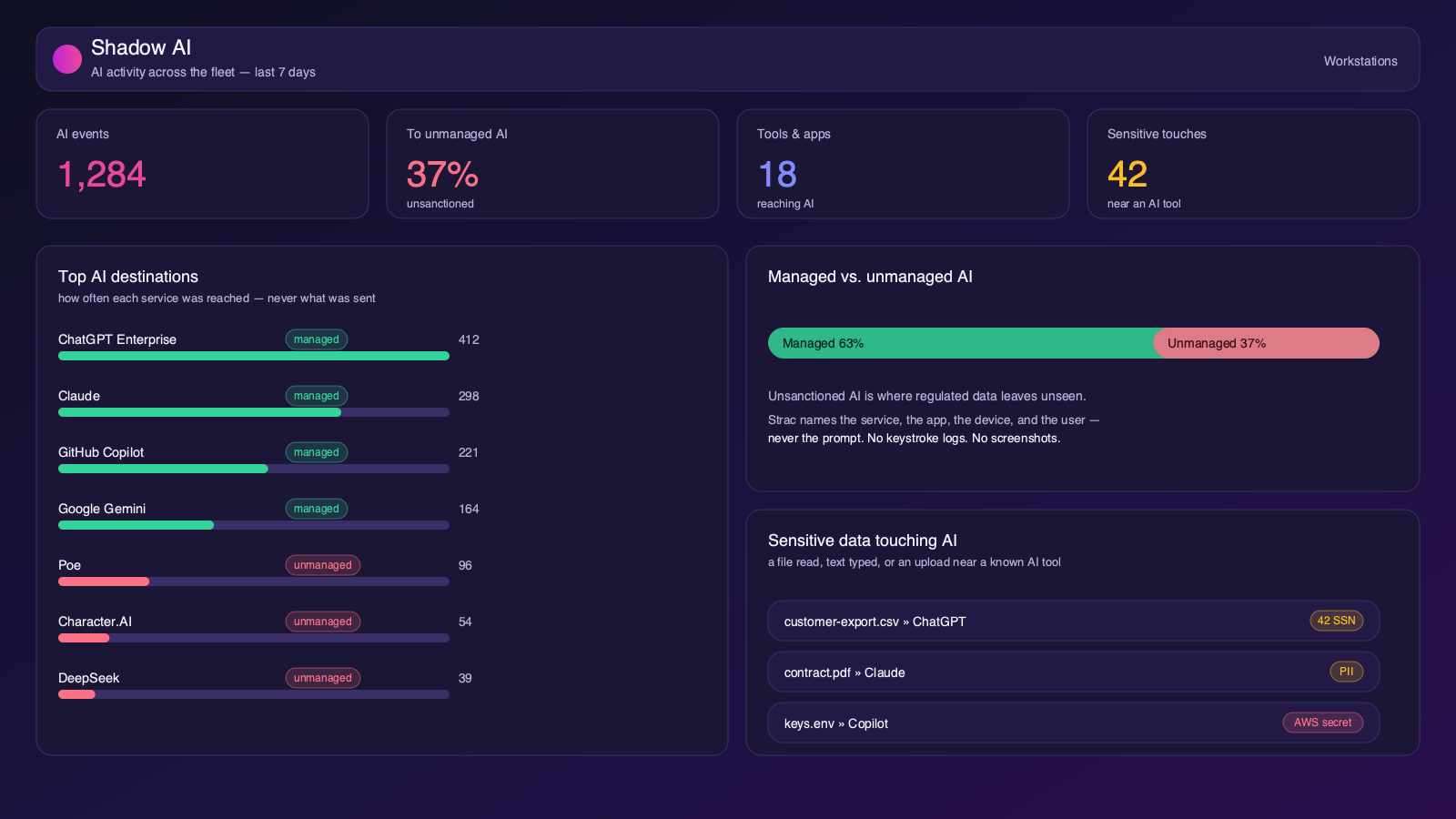
Mac DLP is a security control that prevents sensitive data (PII, PHI, PCI, IP, source code) from being leaked from macOS devices via uploads, copy/paste, screenshots, external drives, email, browsers, or GenAI tools like ChatGPT. It helps security teams enforce data protection directly on employee MacBooks.
Strac’s macOS agent is content aware. It inspects the actual content, such as an SSN, a card number, PHI, an API key or source code, and stops the sensitive file or action rather than the whole application. Every channel is set independently to Audit, Warn, Block, or Off.
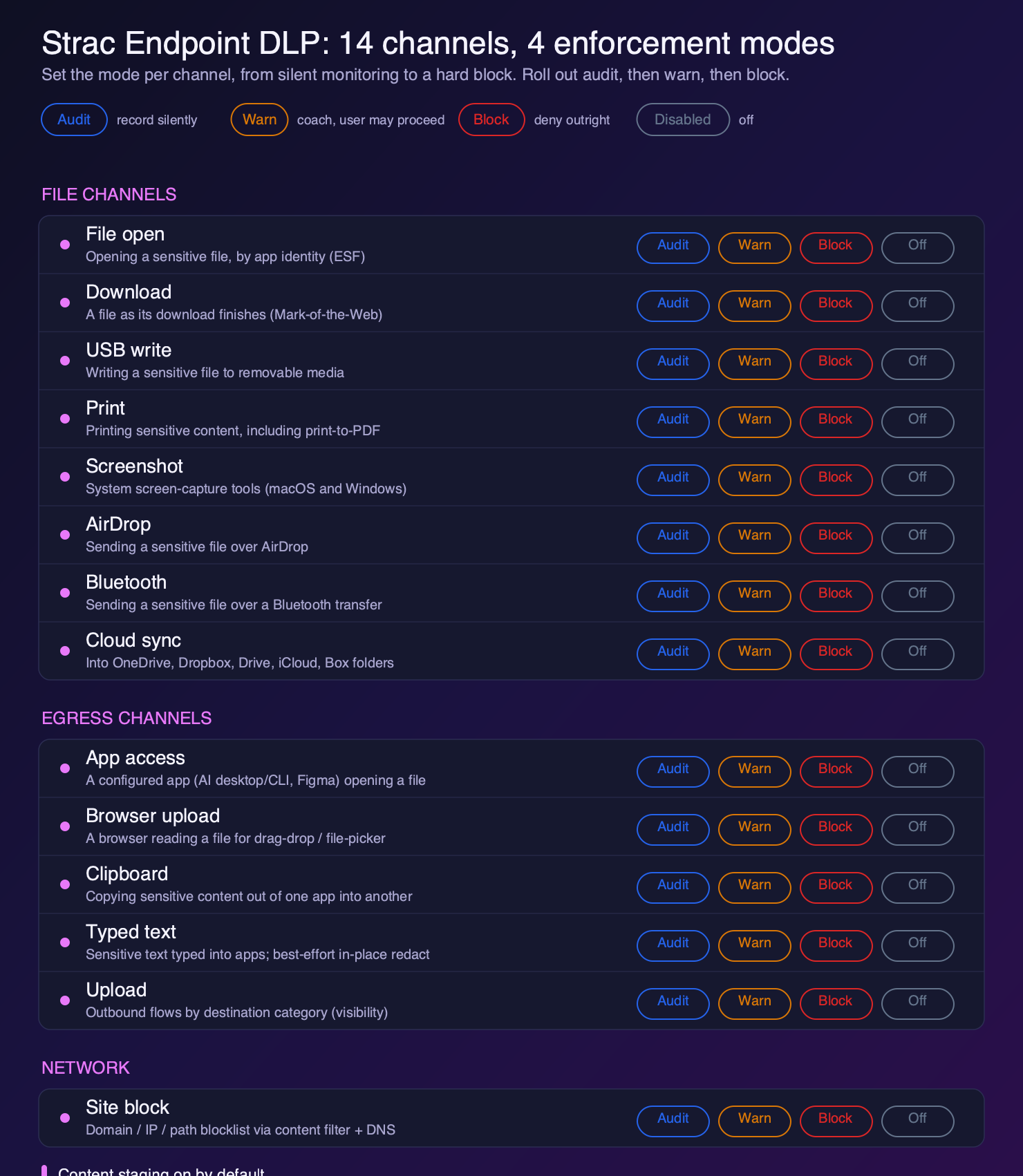
On macOS that means file open, downloads, USB writes, AirDrop and Bluetooth transfers, print, screenshots, iCloud and other cloud sync folders, app access for a named process, browser uploads, clipboard, typed text, outbound uploads, and full site or AI tool blocking by domain. Roll out in Audit first, move to Warn, then Block once you trust the policy.
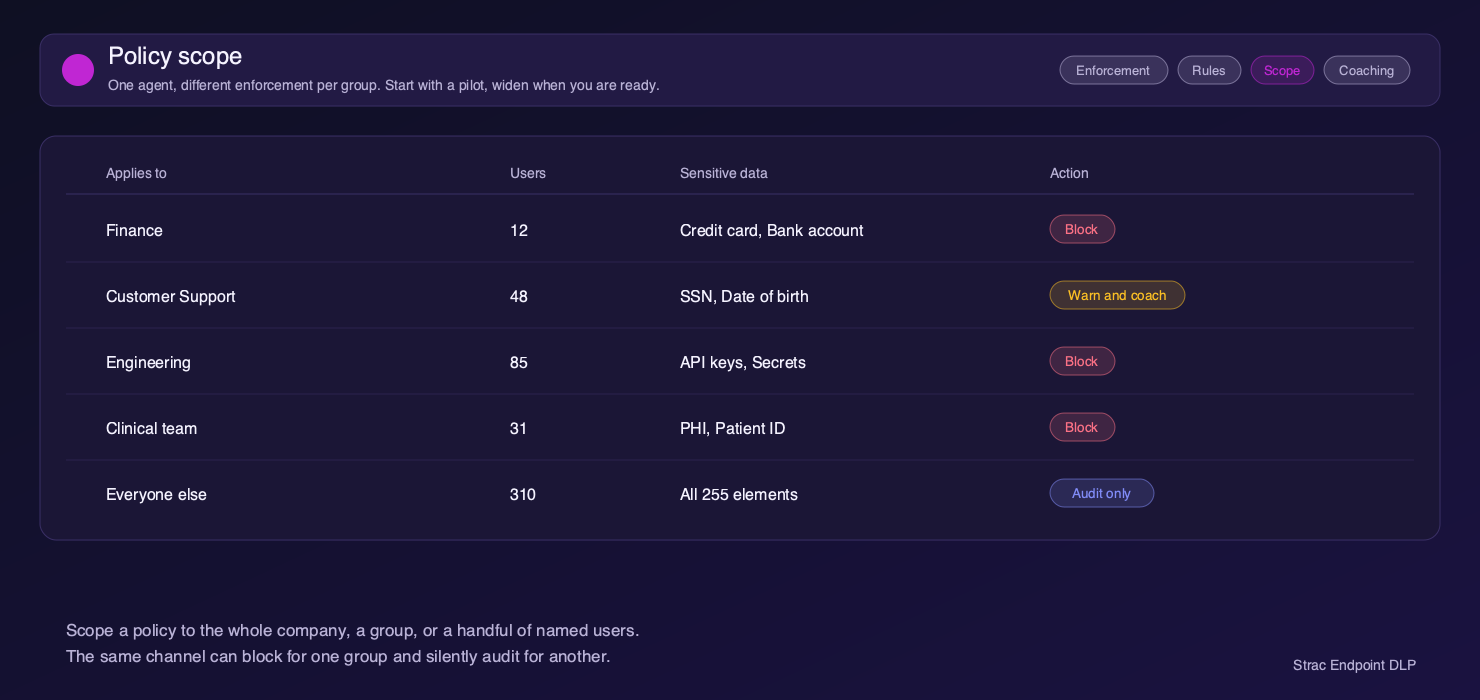
One agent, different rules per group. Scope a policy to the whole company, a single group, or a handful of named users, then widen it when you are ready. The same channel can block for Finance and silently audit for everyone else.
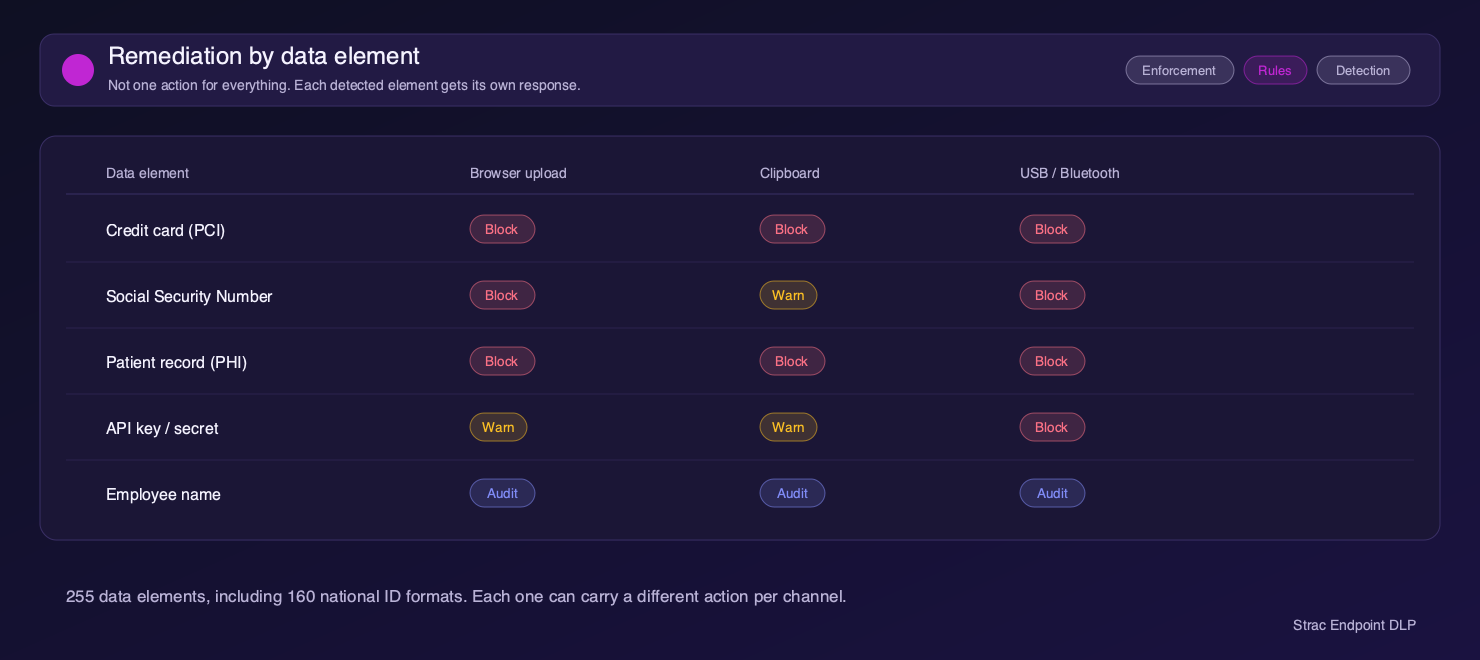
Not one blanket action for everything. Each of the 255 detected elements, including 160 national ID formats, carries its own response per channel. Credit card data can be blocked on every exit while an employee name is only recorded.
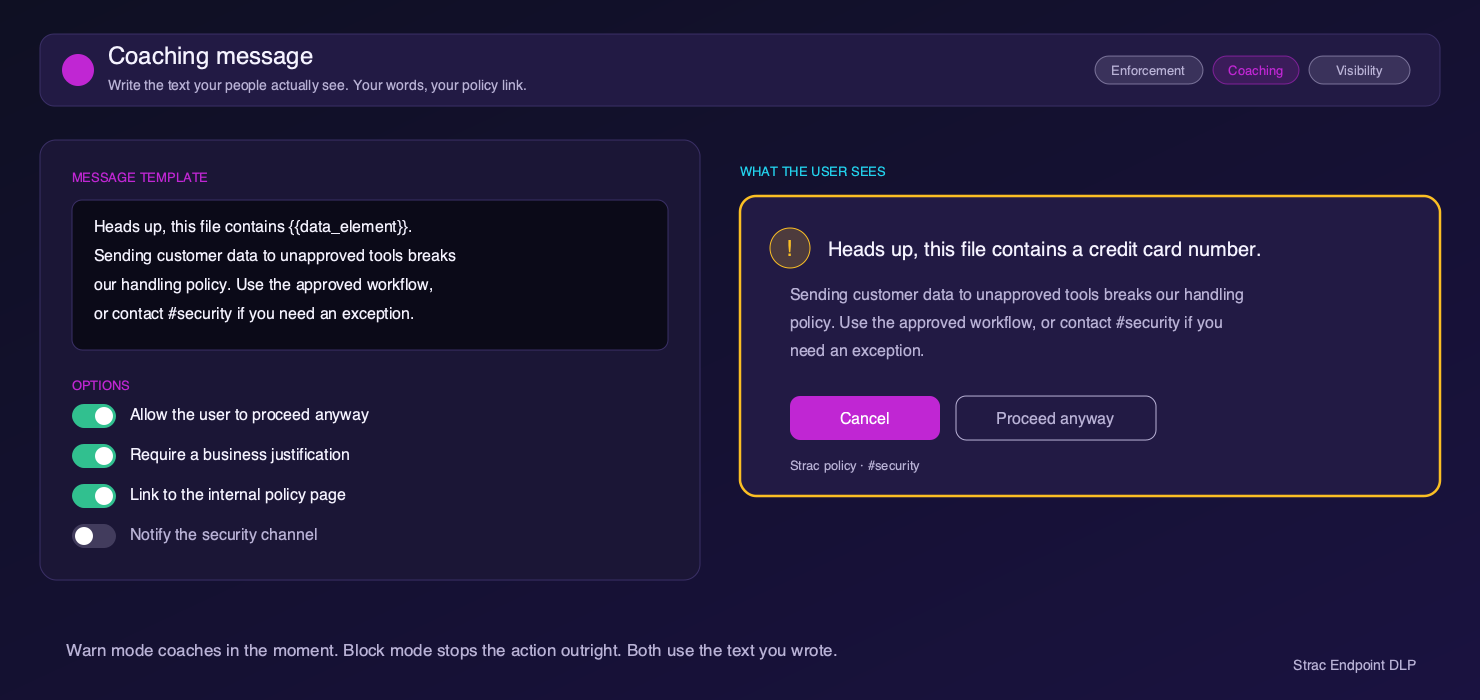
When Strac warns or blocks, people see the message you wrote, not generic vendor text. Link your internal policy page, require a business justification, allow a documented override, or notify your security channel. Warn mode coaches in the moment and Block mode stops the action outright, both using your wording.
The agent runs on macOS, Windows and Linux, and Strac can be deployed in your own cloud tenant on AWS or Azure so regulated data never leaves your environment.
SaaS DLP only sees what happens inside cloud apps. Mac DLP protects what happens before data ever reaches SaaS, like files sitting on a laptop, drag-and-drop into browsers, uploads to GenAI tools, local file access, AirDrop, or copying data into unmanaged apps. Endpoint is where leaks usually start.
Security teams typically adopt Mac DLP to:
Yes. A modern Mac DLP can block or warn on file uploads and copy/paste events in Chrome, Safari, Edge, and GenAI tools like ChatGPT. This is one of the fastest-growing use cases as security teams try to prevent sensitive data from being pasted into AI prompts or uploaded as files.

Data lineage DLP tracks where sensitive files originate, how they move across apps, and where they end up, across local files, browsers, SaaS apps, and GenAI tools. This helps security teams answer:
“Where did this data come from, and where has it been shared?”
You can learn more about how Strac implements this here:
👉 https://www.strac.io/data-lineage-dlp
Traditional endpoint DLP focuses on file scanning and blocking USBs. Modern Mac DLP focuses on:
Yes. Mac DLP inspects file contents (documents, PDFs, spreadsheets, screenshots) for sensitive data like PII, PHI, PCI, secrets, and proprietary information before allowing uploads, shares, or copy/paste actions.
A well-built Mac DLP agent runs locally and is optimized to inspect data only when risky actions occur (uploads, shares, copy/paste, GenAI prompts). Performance impact should be minimal if the solution is designed for real-time workflows on macOS.
Absolutely. Many insider incidents are accidental, not malicious. Mac DLP helps:
This is why security and insider risk teams often deploy Mac DLP together.
Mac DLP provides enforceable controls at the endpoint, which auditors increasingly expect. It supports:
It turns “policy on paper” into actual enforcement on Mac devices.
No. Mid-market companies and fast-growing startups adopt Mac DLP early because:
Most modern Mac DLP solutions can be deployed in days, not months. Lightweight agents, MDM support, and prebuilt policies allow security teams to start with high-risk use cases (GenAI uploads, sensitive file exfiltration) and expand coverage over time.
Yes, and that’s the ideal setup. Mac DLP protects the endpoint, SaaS DLP protects cloud apps, and DSPM helps you understand where sensitive data lives. Together, they provide end-to-end protection from laptop → browser → SaaS → GenAI.
Security teams usually prioritize:
If a Mac DLP can’t stop data leaks into browsers and GenAI tools, it’s missing the biggest risk surface today.


Hear from companies who leveraged Strac to secure and accelerate their business


